a very simple multitouch polyphonic synthesizer. synthicity itself 1.2.2 is now in the app store as of august 7 2013. synthicity itself 1.2.3, a minor update with a volume slider and some bug fixes, will be coming soon (2016). synthicity itself 1.2.4, a minor update to recompile and some bug fixes, will be coming soon (2022).
synthicity itself is simplicity itself.

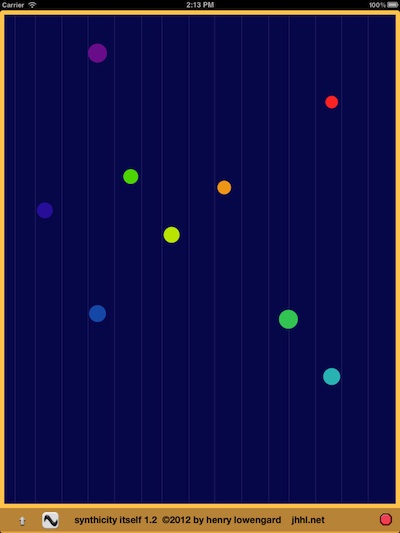
  simply start it up and put your fingers on it.
              it will immediately start playing.

    move your fingers around,
         the sounds will change pitch and timbre.

    there is a simple menu
      accessed simply by touching the bottom bar.

         with it you can change
             some characteristics of the synthetic voices.

     you can constrain the frequencies
           to a small number of scales.
      you can change
           the starting pitch and number of octaves.
     you can change
          the attack rate.
    you can change
       the decay rate.
    you can change
        how fast the synthesizer follows your touches.
      you can add
        a little delay effect.
    you can set
        how many simultaneous voices it can play.
     you can set
          how it chooses those voices.
      you can
           make it quieter.
   were i to add more,
      it wouldn't be simple any more, would it be?

synthicity itself is fully supported
     on the iPad in all orientations and on the iphone and ipod touch.

      synthicity itself. it's so synthle.
touch it with all your fingers.
while it is most interesting with the generous space provided by an ipad, synthicity runs well on iphone and ipod touches.
each touch's horizontal position determines pitch and its vertical position determines the timbre.
a voice is panned left and right in synchrony with a touch's horizontal position.
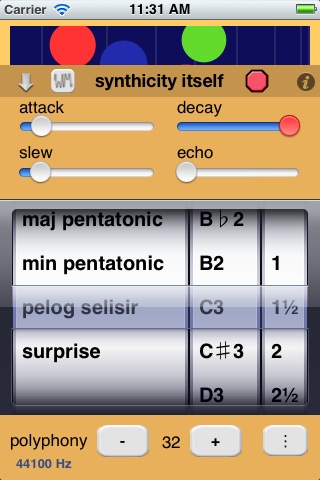
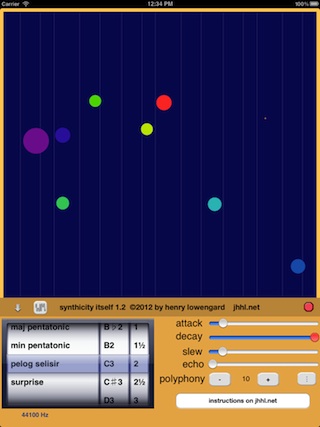
touching the up arrow or bar at the bottom for more than 1/2 second reveals a control page.
touching the timbre button changes the timbre algorithm.
touching the stop sign immediately stops the sound.
touching the slider in the bar at the bottom sets the volume.
touching the info button brings you to this web page.
synthicity can change the timbre of the sounds it produces. each tap of the timbre button picks the next in a series of timbres:
sine
pushed over sine
folded sine
noise
unknown harmonic combination
touching the down arrow or the colored bar on the control panel when it is showing will hide the control panel.
attack is how long it takes for the sound to reach its highest volume after being tapped. sliding to the right will make it longer.
decay is how long it takes for the sound to reach its lowest volume after raising your finger. sliding to the right will make it longer. in fact, sliding it all the way to the right will make it never decay at all, and make the button turn red.
slew is how long it takes for the sound to catch up to where your finger is. sliding to the right will make it longer.
echo changes the length and intensity of the echo effect. sliding to the right will make space the echos out further.
the polyphony plus (+) and minus (-) buttons change the number of simultaneous voices you can play.
the lower this number, the louder the sounds will be. the default number is 10. the maximum is 128.
that said, the more powerful the device and lower the sample rate, the more polyphony you can get. my iphone 4 can only do 33-35 voices at 8000 hz, but the ipad2 can do about 64. newer devices can hit 128.
synthicity will knock down your polyphony setting it it thinks it can't handle it, which is a big improvement over locking up!
the touch assignment toggle button is the least simple control.
when it shows three vertical dots () (create mode), every touch will always try to start a new voice.
when it shows a circle with a dot in it () (select mode), when you touch close to an existing circle,
it will control its corresponding voice, instead of creating a new one.
the scale picker lets you change the following:
you can impose one of these scales on the pitches:
free, no scale at all.
just diatonic, a scale like a major diatonic scale.
12 tones/oct, the standard 12 tones to the octave scale.
harmonics, the natural harmonic scale.
maj pentatonic, a five note major scale. (1/1, 5/4, 4/3, 3/2, 5/3)
min pentatonic, a five note minor scale. (1/1, 6/5, 4/3, 3/2, 8/5)
pelog selisir, a five note Javanese scale. (1/1, 6/5, 4/3, 3/2, 15/8)
surprise, a scale with randomly chosen just intervals.
you can pick the pitch of the left side of the screen, from c3 to c5.
you can pick how many octaves range across the screen, from 1 to 4 in half-octave steps.
at the very bottom of the screen, there's a number representing the sample rate in cycles per second (also known as "hertz", or "hz").
a high sample rate trades off good sound for less polyphony.
if you find synthicity slowing down or acting strange, try touching the stop sign, and then touching this number, and the next sample rate will go into effect.
the sample rates are 44100 hz, 22050 hz,11025 hz and 8000 hz. the noise timbre is especially hard to compute.
hints and tips
important: iphone and ipod touch devices cannot track more than 5 touches at once!
with 6 or more touches, synthicity has to cancel all touch info, which makes all the yellow control circles disappear.
the limit on ipads is a more reasonable 11 touches.
important: ios release 5 and up has a set of features that interpret multiple touch gestures as commands to switch apps and the like. you probably want to turn this off in the settings app, under "general", using the "multitasking gestures" switch.
a fast attack and slew with a short-to-moderate decay gives you a pretty standard-sounding synth sound.
set the polyphony to 1 and play it like an old mono synth. turn up the slew slightly.
the echo is interesting at a number of settings.
you can use the echo to augment the polyphony to make dense clouds of nearly similar pitches. set the octave span to 1.
set the polyphony to 2 or 3 and the scale to harmonics, 2 1/2 octaves or so to get easily controlled drones.
make the deday as long as lossible (never decaying) and set the assignment to select mode to move a lot of pitches around a scale.
if you get stuck notes, the stop sign will clear that up.
as with all ios audio apps, try to run as few things simultaneously as possible in performance
synthicity itself starts up with a fairly quiet 10 note polyphony.
it gets very loud when the polyphony is lower. adjust the volume settings to avoid hearing loss!
turning on the echo also lowers the volume to accommodate more sound.
• available in the iTunes App store.
• questions? go to the contact page
• want a similar app, but very much not synthle, that does granular synthesis, try ellipsynth .
• want a similar app, but very much not synthle, but connects to other apps, try the amazing shoom.
 j h h l . n e t
 sine
sine pushed over sine
 folded sine
 noise
noise unknown harmonic combination
 ) (create mode), every touch will always try to start a new voice.
when it shows a circle with a dot in it (
) (create mode), every touch will always try to start a new voice.
when it shows a circle with a dot in it ( ) (select mode), when you touch close to an existing circle,
it will control its corresponding voice, instead of creating a new one.
) (select mode), when you touch close to an existing circle,
it will control its corresponding voice, instead of creating a new one.